
Inhaltsverzeichnis
UniPager
Intro
Thomas Gatzweiler, DL2IC, wrote in rust a software, which allows to use unipager on all hardware variants and also provides a webinterface.
Installation
You can choose between two methods: The first one uses a script provided by the DAPNET-crew („rund and forget), the second one uses a dapnet repository.
method one - script
via HAMNET
curl http://db0sda.hamnet.radio/debian/install.sh -sSf | sh -s -- hamnet
via internet
curl http://www.afu.rwth-aachen.de/debian/install.sh -sSf | sh -s -- internet
method two - repository
via HAMNET
Create /etc/apt/sources.list.d/unipager.list with this content:
deb http://db0sda.hamnet.radio/debian unipager main
deb-src http://db0sda.hamnet.radio/debian unipager main
Then execute the following commands:
wget -O - http://db0sda.hamnet.radio/debian/rwth-afu.key | sudo apt-key add -
sudo apt-get update
sudo apt-get install unipager
via internet
Create /etc/apt/sources.list.d/unipager.list with this content:
deb http://www.afu.rwth-aachen.de/debian unipager main
deb-src http://www.afu.rwth-aachen.de/debian unipager main
Then execute the following commands:
wget -O - http://www.afu.rwth-aachen.de/debian/rwth-afu.key | sudo apt-key add -
sudo apt-get update
sudo apt-get install unipager
compiling the source code on your own
The software is hosted at https://github.com/rwth-afu/unipager.
You can use github to install the software (please also refer to the README):
git clone https://github.com/rwth-afu/unipager.git
cd unipager
curl https://sh.rustup.rs -sSf | sh -s -- --default-toolchain nightly (installs the rust compiler)
cargo build --release (compiles UniPager)
sudo ./install.sh (installs UniPager)
Please be aware that usage of UART is only possible with deactivated bluetooth interface in the raspberry pi
See: https://www.raspberrypi.org/documentation/configuration/uart.md
configuration and webinterface
UniPager provides a HTTP_server on port 8073. The website shows the log, the type of transmitter and its settings. It also enables the user to config it.
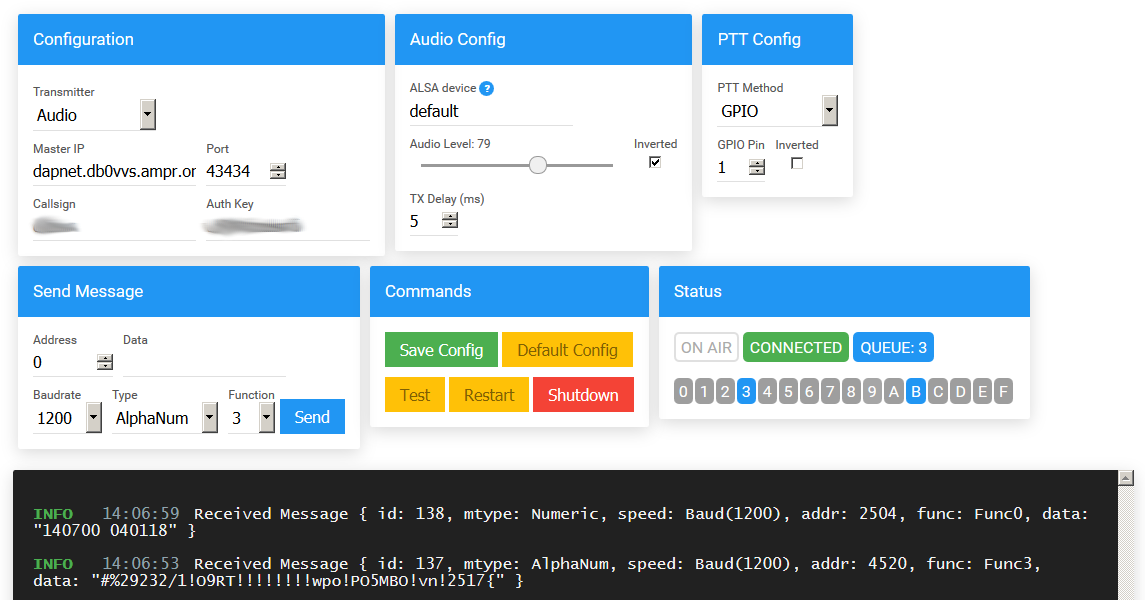
addresses for connecting to a dapnet-server
Um Sender anzubinden, you can use as default db0sda. Please be aware, that the transmitter had to be added there before by an admin (please open a support ticket
type hostname IP Port
Internet dapnet.afu.rwth-aachen.de 137.226.79.100 43434
Hamnet dapnet.db0sda.hamnet.radio 44.149.166.27 43434
Update
If UniPager was installed via repository (method 2), you can use the package manager to update it as usual:
sudo apt-get update
sudo apt-get upgrade
If the software was complied on your own, you can do a „git pull“ for the latest version and compile it again. To update software and rust compiler, you can use
./update.sh
in the UniPager directory. The script updates the rust compiler and also the UniPager itself.
testing version
There is also a testing version in the github repository, which can contain new features (but also bugs  ).
Please use this version only if you know, that you are doing.
Change /etc/apt/sources.list.d/unipager.list :
deb http://www.afu.rwth-aachen.de/debian unipager-testing main
deb-src http://www.afu.rwth-aachen.de/debian unipager-testing main
Then do an update via package manager:
sudo apt-get update
sudo apt-get upgrade
access control
access control is already implemented but will be improved: https://github.com/rwth-afu/UniPager/issues/12
sending a message direct via UniPager
Via Websocket-protocol and a script it is possible to send directly. See the code at https://github.com/dk4pa/UniPager-SendWebsocket.
statistics
With commit 5120af3c were statistics added to UniPager. They provide information about status, time slots, message queue and number of sent messages.
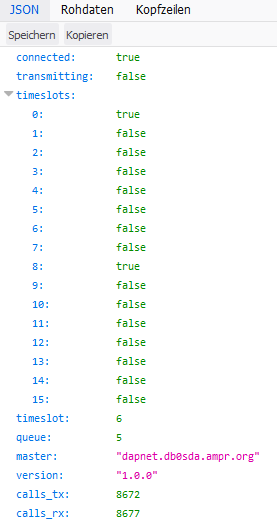
Address for this JSON-object: http://unipager_ip:8073/status
Port forwarding
For external access you have to open ports 8073 and 8055 in your firewall/forward it in your router. Please configure an access control before (see below)
password for webinterface
To protect the webinterface, create the file /var/lib/unipager/password an and add the password there.
logfile UniPager on a Raspi
Can be accessed with „sudo journalctl -u unipager“.
configuration of USB-sound devices
At the beginning lookup the ID of the sound device:
cat /proc/asound/cards
:
0 [ALSA ]: bcm2835 - bcm2835 ALSA
bcm2835 ALSA
1 [Device ]: USB-Audio - USB Audio Device
C-Media Electronics Inc. USB Audio Device at usb-3f980000.usb-1.4, full speed
In the example above the usb-sound device has the ID 1, so you enter in the UniPager configuration
plughw:1
.
troubles with internal raspberry sound card
In rare cases troubles (sometimes with pi1 and pi2) with the output level can occur. Then please use an external sound device (see above).